How Do Java Development Teams Use Docker and Kubernetes to Deploy Applications?
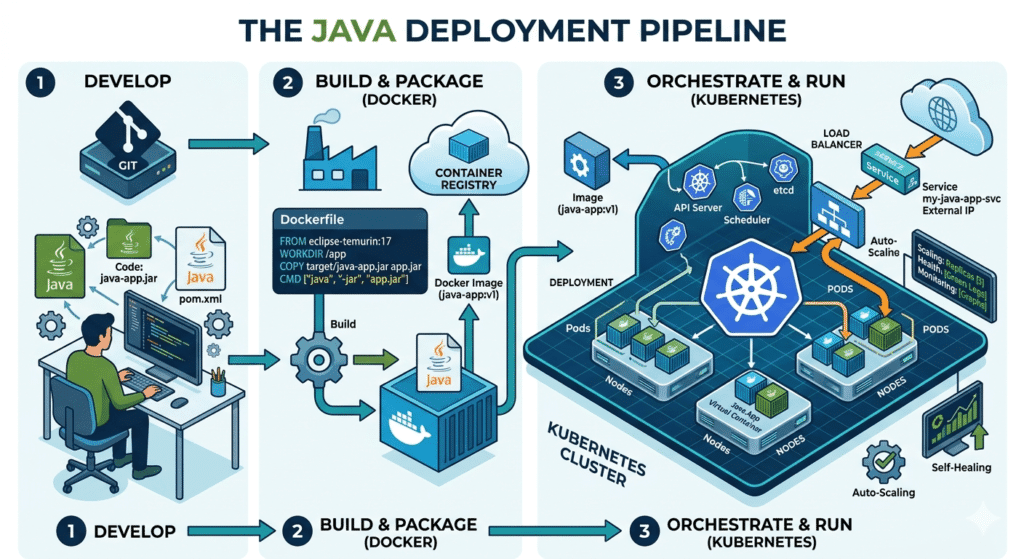
Developing Java apps today isn’t just about writing code—it’s about delivering it smoothly. In recent years, many firms offering Java software development services are expected to deliver faster and more reliable updates without compromising stability. However, this becomes a problem when environments differ between development, testing, and production.
Here is where Docker for Java development and Kubernetes come into play. Docker packages your applications in one unit, while Kubernetes makes sure that it scales. Together, they help teams deploy Java apps with Docker Kubernetes with ease, consistency, and reliability, meaning that the applications will behave in a uniform manner irrespective of the environment—no more last-minute surprises.
How Docker Simplifies Java Application Packaging
In simple terms, Docker is like an intelligent box where you pack your Java application together with all necessary libraries, dependencies, and configurations. Such packages are called container images.
When using Docker for Java development, containerized applications will work uniformly across any environment. That is, there will not be such an issue as “works only on my computer.”
Here is what makes Docker attractive for developers:
- It operates using the same container runtime.
- The images can be saved in a container registry for future use.
- Installation becomes much faster.
For Java apps having many dependencies, Docker simplifies the entire process and makes testing and deployment faster.
Managing Containers at Scale with Kubernetes
When the containerization process is completed, the management becomes an issue, particularly when you have dozens or hundreds. Kubernetes is a platform that solves that problem.
Kubernetes may be described as a smart manager for your containers. It handles scaling, failures, and traffic without the continuous efforts of developers. In Java microservices Kubernetes setups, it is particularly very useful. Actually, Kubernetes adoption has reached over 60% among enterprises, which makes it one of the most used platforms for container management.
So, how does Kubernetes work? It uses pods and containers to organize and run them across Kubernetes clusters (groups of machines).
Kubernetes provides a number of benefits:
- Automatic management of container orchestration.
- Load balancing capabilities for handling traffic.
- Service discovery functionality.
- Immediate restarting of failed containers.
For large-scale Java applications, especially for those designed with a microservices architecture, Kubernetes becomes very helpful.
How Docker and Kubernetes Work Together in Real Projects
So let us now join all the dots to understand how these two technologies are applied side by side in actual projects. In particular, this is when an effective Java container deployment strategy proves helpful.
The following is the basic workflow sequence:
- Developers build the Java application.
- They package it into a Docker image.
- The image is stored in a container registry.
- Kubernetes pulls the image and runs it.
- Teams define setups using deployment manifests or Helm charts.
- Kubernetes manages scaling, updates, and monitoring.
This approach makes it easy to deploy Java applications in containers without much hassle.
When working with a microservices architecture, every service operates inside its container. Developers can modify individual services without disturbing other components. Thus, container-based Java applications allow for more efficient and continuous deployment.
To sum up, working with Docker container Kubernetes workflows is rather productive.
Real Advantages of Modern Java Deployment Practices
Deploying apps using both Docker and Kubernetes leads to actual advantages. Teams have been observed to experience accelerated release cycles and decreased deployment problems.
What gets better?
- Rapid delivery via continuous deployment.
- Scalability made simple with auto scaling.
- Safer updates using rolling updates.
- Effective cooperation between development and operations teams.
- Stable software development on Kubernetes infrastructure.
For instance, if the number of users increases abruptly, Kubernetes will automatically increase the number of containers. If a container fails, Kubernetes immediately replaces it. This keeps applications stable and responsive without manual effort.
What to Know Before Adopting Docker and Kubernetes
Of course, these technologies are powerful, but they take some time to learn. The most common question is the difference between Docker and Kubernetes.
The answer is simple:
- Docker creates and runs containers.
- Kubernetes manages containers across systems.
Does Kubernetes use Docker? The technology utilizes containerization tools, and although Docker is commonly applied, Kubernetes actually interacts with a container runtime behind the scenes.
Teams also need to manage things like:
- Config maps for application settings
- Networking between services
- Security of container images
With careful preparation, all these problems can be solved successfully.
Conclusion: The Future of Java Deployment Starts Here
In today’s world, Java development teams require technologies that ensure quickness, reliability, and scalability. Docker and Kubernetes deliver all three. Docker manages packaging the application, while Kubernetes manages deployment and operations.
When teams deploy Java apps with Docker Kubernetes, they create systems that are flexible, reliable, and easy to scale. A well-planned Java container deployment strategy helps mitigate risks and streamline the process of deployment.
With the rise of cloud-native development, such strategies will shape how future Java apps are built and delivered.
FAQs
1. What is the difference between Docker and Kubernetes?
Docker builds and operates containers. Kubernetes handles those containers across different servers.
2. Does Kubernetes use Docker?
Kubernetes supports container technologies, and Docker is one of the common containerization frameworks used with Kubernetes.
3. Why do Java developers prefer Docker and Kubernetes?
They enable developers to deploy applications quickly without issues and facilitate the scaling of the application.